§ July 28, 2012
A Standard CRC-16 and CRC-16 Kermit implementation in C#
Been a while since I posted anything, but here's an update to my original CRC-16 class that does CRC-16 with CRC-CCITT Kermit code that I posted over on Stack Overflow a while ago. Unlike the code over there this doesn't have a static look-up table (feel free to get the code from over there if you wanted the static table, but I'm actually not too fond of static look-up tables on example source code though they are more efficient).
Links to the other C# CRC implementations the original CRC-16 implementation, CRC16-CCITT, CRC-32, and CRC-8
I've consolidated all of these into a single library on GitHub here: NullFX.CRC.
I'm also very into Swift at the moment and have created Swift versions of these same classes and released a Swift PM version of this library here as well Swift NullfxCrc Package
Been a while since I posted anything, but here's an update to my original CRC-16 class that does CRC-16 with CRC-CCITT Kermit code that I posted over on Stack Overflow a while ago. Unlike the code over there this doesn't have a static look-up table (feel free to get the code from over there if you wanted the static table, but I'm actually not too fond of static look-up tables on example source code though they are more efficient).
using System;

public enum Crc16Mode : ushort { Standard = 0xA001, CcittKermit = 0x8408 }

public class Crc16 {
    readonly ushort[] table = new ushort[256];

    public ushort ComputeChecksum( params byte[] bytes ) {
        ushort crc = 0;
        for(int i = 0; i < bytes.Length; ++i) {
            byte index = (byte)(crc ^ bytes[i]);
            crc = (ushort)((crc >> 8) ^ table[index]);
        }
        return crc;
    }

    public byte[] ComputeChecksumBytes( params byte[] bytes ) {
        ushort crc = ComputeChecksum( bytes );
        return BitConverter.GetBytes( crc );
    }

    public Crc16( Crc16Mode mode ) {
        ushort polynomial = (ushort)mode;
        ushort value;
        ushort temp;
        for(ushort i = 0; i < table.Length; ++i) {
            value = 0;
            temp = i;
            for(byte j = 0; j < 8; ++j) {
                if(((value ^ temp) & 0x0001) != 0) {
                    value = (ushort)((value >> 1) ^ polynomial);
                }else {
                    value >>= 1;
                }
                temp >>= 1;
            }
            table[i] = value;
        }
    }
}
If you need for this code to be CLS compliant, you can change the method signature's return type from ushort to int and it will operate the same (the ushort crc value will be implicitly converted from ushort to int)
Links to the other C# CRC implementations the original CRC-16 implementation, CRC16-CCITT, CRC-32, and CRC-8
I've consolidated all of these into a single library on GitHub here: NullFX.CRC.
I'm also very into Swift at the moment and have created Swift versions of these same classes and released a Swift PM version of this library here as well Swift NullfxCrc Package
Article Sections :: C # Articles
§ February 4, 2010
A CRC8 implementation in C#
So I've tackled CRC32, CRC16, CRC16-CCITT (and now CRC16-CCITT Kermit) implementations, and found myself wanting a CRC8 class to create checksums for small data (1-2 bytes) sets. Not having ever used or seen CRC8 in use before, I did some reading, and as far as I can tell, I've implemented it correctly... It works anyway, so without further ado, here's my implementation:
This one differs slightly (API wise) from my previous ones, mainly because I was using it for checksum'ing smaller bits of data, so I made the ComputeChecksum method a params argument instead of a first class array type.
Here's a sample of how I was using it (and testing it):
If you have any questions / comments / corrections, post them in the forums.
I've consolidated all of these into a single library on GitHub here: NullFX.CRC.
I'm also very into Swift at the moment and have created Swift versions of these same classes and released a Swift PM version of this library here as well Swift NullfxCrc Package
So I've tackled CRC32, CRC16, CRC16-CCITT (and now CRC16-CCITT Kermit) implementations, and found myself wanting a CRC8 class to create checksums for small data (1-2 bytes) sets. Not having ever used or seen CRC8 in use before, I did some reading, and as far as I can tell, I've implemented it correctly... It works anyway, so without further ado, here's my implementation:
public static class Crc8 {
    static byte[] table = new byte[256];
    // x8 + x7 + x6 + x4 + x2 + 1
    const byte poly = 0xd5;

    public static byte ComputeChecksum(params byte[] bytes ) {
        byte crc = 0;
        if ( bytes != null && bytes.Length > 0 ) {
            foreach ( byte b in bytes ) {
                crc = table[crc ^ b];
            }
        }
        return crc;
    }

    static Crc8( ) {
        for ( int i = 0; i < 256; ++i ) {
            int temp = i;
            for ( int j = 0; j < 8; ++j ) {
                if ( ( temp & 0x80 ) != 0 ) {
                    temp = ( temp << 1 ) ^ poly;
                } else {
                    temp <<= 1;
                }
            }
            table[i] = (byte)temp;
        }
    }
}
This one differs slightly (API wise) from my previous ones, mainly because I was using it for checksum'ing smaller bits of data, so I made the ComputeChecksum method a params argument instead of a first class array type.
Here's a sample of how I was using it (and testing it):
byte crc = Crc8.ComputeChecksum( 1, 2, 3 );
byte check = Crc8.ComputeChecksum( 1, 2, 3, crc );
// here check should equal 0 to show that the checksum is accurate
if ( check != 0 ) {
    Console.WriteLine( "Error in the checksum" );
}
If you have any questions / comments / corrections, post them in the forums.
I've consolidated all of these into a single library on GitHub here: NullFX.CRC.
I'm also very into Swift at the moment and have created Swift versions of these same classes and released a Swift PM version of this library here as well Swift NullfxCrc Package
Article Sections :: C # Articles
§ December 18, 2008
Pre-increment vs post-increment operators
Ok, so here's a question for you that most people should have learned in school, but didn't. You have to answer this without running to visual studio.
Most of us when we learned C style programming were taught that pre-increment increments the value before taking the value, and that post increment takes the value then increments. After being taught that, pretty much every professor, every code sample, and everybody under the sun used post increment for every single iterative example in existence.
Question is... WHY?
Read the rest of this article... (558 words)
Ok, so here's a question for you that most people should have learned in school, but didn't. You have to answer this without running to visual studio.
- What is the difference between ++i and i++?
- What is the output of the following piece of code:
for(int i = 0; i < 5; ++i) {
    Console.WriteLine(i);
}
Is it: A)
1
2
3
4
or: B)
0
1
2
3
4
I'm sure there are quite a few who would choose A, but this is in fact incorrect (go ahead and run it in visual studio now).
Most of us when we learned C style programming were taught that pre-increment increments the value before taking the value, and that post increment takes the value then increments. After being taught that, pretty much every professor, every code sample, and everybody under the sun used post increment for every single iterative example in existence.
Question is... WHY?
Read the rest of this article... (558 words)
Article Sections :: C # Articles
§ January 31, 2008
A C# Command Line Args processing class
The other day I was working on our video game's content server app. The way its set up is fairly complicated. It basically has 3 modes that it can run in (as a windows service, as a fully blown console shell, or as a windows application).
Being tired of writing long ugly blocks of code for command line arg's processing, I decided to build out an object (not at all like my last command line parser class) that would manage the command line args in an intuitive manner.
There are Three basic ways to use this class:
Read the rest of this article... (2439 words)
The other day I was working on our video game's content server app. The way its set up is fairly complicated. It basically has 3 modes that it can run in (as a windows service, as a fully blown console shell, or as a windows application).
Being tired of writing long ugly blocks of code for command line arg's processing, I decided to build out an object (not at all like my last command line parser class) that would manage the command line args in an intuitive manner.
There are Three basic ways to use this class:
- Sort of like a dictionary
- With one big event handler
- By registering specific event handlers
static class Program {
    static void Main(string[] args) {
        List<string> cmdArgs = new List<string>(args);
        if(cmdArgs.Contains("/myswitch"))) {
            // ... whatever ...
        }
    }
}
Read the rest of this article... (2439 words)
Article Sections :: C # Articles
§ June 6, 2007
C# .NET Single Instance Application
Today I wanted to refactor some code that prohibited my application from running multiple instances of itself.
Previously I had use System.Diagnostics.Process to search for an instance of my myapp.exe in the process list. While this works, it brings on a lot of overhead, and I wanted something cleaner.
Knowing that I could use a mutex for this (but never having done it before) I set out to cut down my code and simplify my life.
In the class of my application main I created a static named Mutex:
Mutex.WaitOne has an overload that specifies an amount of time for us to wait. Since we're not actually wanting to synchronizing our code (more just check if it is currently in use) we use the overload with two parameters: Mutex.WaitOne(Timespan timeout, bool exitContext). Wait one returns true if it is able to enter, and false if it wasn't. In this case, we don't want to wait at all; If our mutex is being used, skip it, and move on, so we pass in TimeSpan.Zero (wait 0 milliseconds), and set the exitContext to true so we can exit the synchronization context before we try to aquire a lock on it. Using this, we wrap our Application.Run code inside something like this:
Read the rest of this article... (872 words)
Today I wanted to refactor some code that prohibited my application from running multiple instances of itself.
Previously I had use System.Diagnostics.Process to search for an instance of my myapp.exe in the process list. While this works, it brings on a lot of overhead, and I wanted something cleaner.
Knowing that I could use a mutex for this (but never having done it before) I set out to cut down my code and simplify my life.
In the class of my application main I created a static named Mutex:
static class Program {
    static Mutex mutex = new Mutex(true, "{8F6F0AC4-B9A1-45fd-A8CF-72F04E6BDE8F}");
    [STAThread]
    ...
}
Having a named mutex allows us to stack synchronization across multiple threads and processes which is just the magic I'm looking for.
Mutex.WaitOne has an overload that specifies an amount of time for us to wait. Since we're not actually wanting to synchronizing our code (more just check if it is currently in use) we use the overload with two parameters: Mutex.WaitOne(Timespan timeout, bool exitContext). Wait one returns true if it is able to enter, and false if it wasn't. In this case, we don't want to wait at all; If our mutex is being used, skip it, and move on, so we pass in TimeSpan.Zero (wait 0 milliseconds), and set the exitContext to true so we can exit the synchronization context before we try to aquire a lock on it. Using this, we wrap our Application.Run code inside something like this:
Read the rest of this article... (872 words)
Article Sections :: C # Articles
§ April 4, 2007
Creating Fake Enums
In .NET enums are a strongly typed flag-like object. Flags would normally defined as a macro, or constant variable. The trouble with typical numeric flags is that a) the coder using the flag may or may not know all of the possible values, or b) might accidentally type the wrong constant or macro. Since the flag is just some magic number they may end up with a logic error that may be hard to find under certain circumstances. With enums I can provide the same logic (some numeric flag) but create a type that I can use to enforce some subset of numbers that are checked at compile time, and can be verified at run time ( Enum.IsDefined ). As with everything, enums have their faults. What if I want to extend some enum object (polymorphic enums?), or give it additional functionality or meta data. Yesterday at work we ran across a case where being able to extend an enum was mandatory. All of our enums have numeric and string values, and are typically written like:
Our company uses code generation like most fish use water. We use enums quite a bit and each enum type and all of their values are stored in a database which is used by the code generation tool to generate 99% of our business and data layer code. Since our code is generated, if we go in and manually add additional values that don't need to be stored in the database, our generation tool will blow away any hand written changes on every build. We would have killed to have something like a partial enum, but alas, no such thing exists.
I set out to try to create a "Fake Enum" class that acted and felt like an enum but allowed us to extend it by way of the partial class or inheritance. Well after a little poking around, inheritance flew out the window (just over complex without resorting to some generics base type), but the ability to do a partial fake enum was definitely doable.
Here's the code I came up with:
Read the rest of this article... (2536 words)
In .NET enums are a strongly typed flag-like object. Flags would normally defined as a macro, or constant variable. The trouble with typical numeric flags is that a) the coder using the flag may or may not know all of the possible values, or b) might accidentally type the wrong constant or macro. Since the flag is just some magic number they may end up with a logic error that may be hard to find under certain circumstances. With enums I can provide the same logic (some numeric flag) but create a type that I can use to enforce some subset of numbers that are checked at compile time, and can be verified at run time ( Enum.IsDefined ). As with everything, enums have their faults. What if I want to extend some enum object (polymorphic enums?), or give it additional functionality or meta data. Yesterday at work we ran across a case where being able to extend an enum was mandatory. All of our enums have numeric and string values, and are typically written like:
public enum Foo {
    [FriendlyName("One Foo")]
    One = 1,
    [FriendlyName("Two Foo")]
    Two = 2,
    [FriendlyName("Three Foo")]
    Three = 3
}
the FriendlyName attribute enables you to have both a numeric flag value as well as some human readable value of the enum element other than "One" or "Two" or "SomeEnumValue"(ie: Foo.One.ToString())
Our company uses code generation like most fish use water. We use enums quite a bit and each enum type and all of their values are stored in a database which is used by the code generation tool to generate 99% of our business and data layer code. Since our code is generated, if we go in and manually add additional values that don't need to be stored in the database, our generation tool will blow away any hand written changes on every build. We would have killed to have something like a partial enum, but alas, no such thing exists.
I set out to try to create a "Fake Enum" class that acted and felt like an enum but allowed us to extend it by way of the partial class or inheritance. Well after a little poking around, inheritance flew out the window (just over complex without resorting to some generics base type), but the ability to do a partial fake enum was definitely doable.
Here's the code I came up with:
Read the rest of this article... (2536 words)
Article Sections :: C # Articles
§ February 13, 2007
C# 3.0 Lambda expressions
I've finally seen the light for these little buggers. As I wrote in my original post that I really didn't glean much from the description of lambda expressions that are mentioned in the specification, but I ran across a great article on it on the code project that did a really good job at explaining it.
So my meta blog for the day is a link to that article:
» http://www.codeproject.com/csharp/lambdaexpressions.asp
I've finally seen the light for these little buggers. As I wrote in my original post that I really didn't glean much from the description of lambda expressions that are mentioned in the specification, but I ran across a great article on it on the code project that did a really good job at explaining it.
So my meta blog for the day is a link to that article:
» http://www.codeproject.com/csharp/lambdaexpressions.asp
Article Sections :: C # Articles
§ January 26, 2007
Phalanger, PHP for .NET
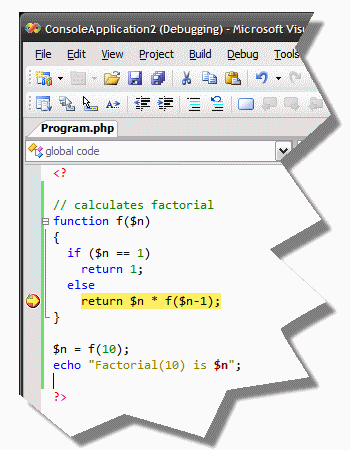
I ran across an article on the code project about a PHP compiler / language extension for .NET.
PHP has an extension for .NET that allows you to use .NET resources in PHP code, but this allows you to use PHP from .NET, with support for native PHP API's as well as managed compilation. This project may end up making my article on nusoap & C# obsolete, though it should make writing web services in PHP as easy as it is in C#.
» Phalanger Home
» Code Project Article
I ran across an article on the code project about a PHP compiler / language extension for .NET.
PHP has an extension for .NET that allows you to use .NET resources in PHP code, but this allows you to use PHP from .NET, with support for native PHP API's as well as managed compilation. This project may end up making my article on nusoap & C# obsolete, though it should make writing web services in PHP as easy as it is in C#.
» Phalanger Home
» Code Project Article
Article Sections :: C # Articles :: Tech. Articles
§ January 6, 2007
.NET Reflection
What is reflection? Its the image we seen in a mirror. In .NET however its a system that lets you do at runtime what you would normally do in a text editor or visual studio.
Like most object oriented programming languages, .net has the concept of a "type." a Type defines what an object is. Whether your using a primitive such as an integer, or a complex data type, each thing in .net has a type that corresponds to what it is.
To understand reflection, you need to understand what a class is, how encapsulation works (what access modifiers are), what a function is and what variables are. We could go a little further, but thats a good starting point.
Lets take our previous class declaration and spice it up a bit.
On the surface (which I wont scratch much) reflection allows you to access, modify or invoke members of an object.
In our editor we can do this very easily:
Read the rest of this article... (1364 words)
What is reflection? Its the image we seen in a mirror. In .NET however its a system that lets you do at runtime what you would normally do in a text editor or visual studio.
Like most object oriented programming languages, .net has the concept of a "type." a Type defines what an object is. Whether your using a primitive such as an integer, or a complex data type, each thing in .net has a type that corresponds to what it is.
public class Foo {}
This class is of type Foo. Now this class is basically pointless... Why? Well because it has no members. Actually it does have members because everything inherits from System.Object, and System.Object has 12 member methods some have overloads, some are static, some are private some are protected others are public. For the sake of simplicity, we wont discuss System.Object, but will stick only to Foo.public class Foo { private int a; }Typically we'd never have a class that looked like this. After all, the complier would never let us access Foo::a because it is a private member. What does this have to do with reflection you may ask yourself? The rules of the compiler do not apply to reflection.
To understand reflection, you need to understand what a class is, how encapsulation works (what access modifiers are), what a function is and what variables are. We could go a little further, but thats a good starting point.
Lets take our previous class declaration and spice it up a bit.
public class Foo {
    private int a;

    public int A {
        get { return a; }
        set { a = value; }
    }

    public bool Bar(string input) {
        return input == "Baz";
    }

    protected void Bing() {
        Console.WriteLine("I'm not very creative");
    }

    public Foo() { }
}
I've given Foo a makeover. It now has a private variable, a public property, a public and a protected method and a constructor. I've given Foo a few "members."
On the surface (which I wont scratch much) reflection allows you to access, modify or invoke members of an object.
In our editor we can do this very easily:
Read the rest of this article... (1364 words)
Article Sections :: C # Articles
§ December 15, 2006
Standard CRC 16 in C#
I've been working on a service at work that will end up being this big cluster of servers that all talk with each other. One of the things I needed was a small crc checksum for some of the more compact UDP messages that get sent around. I thought about just using the CRC16-CCITT library I already had, but decided on using the standard CRC16 algorithm. Since I posted the CRC32 and CRC16-CCITT implementations I thought I'd post this one too.
Links to the other C# CRC implementations CRC16-CCITT, CRC16-CCITT Kermit, CRC32, and CRC8
I've consolidated all of these into a single library on GitHub here: NullFX.CRC.
I'm also very into Swift at the moment and have created Swift versions of these same classes and released a Swift PM version of this library here as well Swift NullfxCrc Package
I've been working on a service at work that will end up being this big cluster of servers that all talk with each other. One of the things I needed was a small crc checksum for some of the more compact UDP messages that get sent around. I thought about just using the CRC16-CCITT library I already had, but decided on using the standard CRC16 algorithm. Since I posted the CRC32 and CRC16-CCITT implementations I thought I'd post this one too.
using System;

public class Crc16 {
    const ushort polynomial = 0xA001;
    ushort[] table = new ushort[256];

    public ushort ComputeChecksum(byte[] bytes) {
        ushort crc = 0;
        for(int i = 0; i < bytes.Length; ++i) {
            byte index = (byte)(crc ^ bytes[i]);
            crc = (ushort)((crc >> 8) ^ table[index]);
        }
        return crc;
    }

    public byte[] ComputeChecksumBytes(byte[] bytes) {
        ushort crc = ComputeChecksum(bytes);
        return BitConverter.GetBytes(crc);
    }

    public Crc16() {
        ushort value;
        ushort temp;
        for(ushort i = 0; i < table.Length; ++i) {
            value = 0;
            temp = i;
            for(byte j = 0; j < 8; ++j) {
                if(((value ^ temp) & 0x0001) != 0) {
                    value = (ushort)((value >> 1) ^ polynomial);
                }else {
                    value >>= 1;
                }
                temp >>= 1;
            }
            table[i] = value;
        }
    }
}
If you need for this code to be CLS compliant, you can change the method signature's return type from ushort to int and it will operate the same (the ushort crc value will be implicitly converted from ushort to int)
Links to the other C# CRC implementations CRC16-CCITT, CRC16-CCITT Kermit, CRC32, and CRC8
I've consolidated all of these into a single library on GitHub here: NullFX.CRC.
I'm also very into Swift at the moment and have created Swift versions of these same classes and released a Swift PM version of this library here as well Swift NullfxCrc Package
Article Sections :: C # Articles
© 2003 - 2024 NullFX
